Terms & Conditions are rarely optional in a customer portal: GDPR, consent, legal traceability. Power Pages ships a built-in feature that forces users to accept them at sign-in.
Setup looks like five minutes of site settings, but it has a trap that throws no error: if one particular content snippet is empty, the dialog simply doesn't appear. No error, no warning, no console message.
This post walks through the complete setup, verified against the Microsoft docs, the silent failure, and an observation from the demo portal that explains why the dialog still won't show for your already-logged-in test user.
The one site setting that drives the dialog
The recurring consent dialog hangs on a single documented setting plus a date:
| Site setting | Value | Meaning |
|---|---|---|
| Authentication/Registration/TermsAgreementEnabled | true | Turns on the consent requirement. Users must agree before they're considered authenticated. Default false. |
| Authentication/Registration/TermsPublicationDate | Date (GMT) | Effective date of the current version. Anyone who hasn't accepted after this date is asked again on next sign-in. Without a date: every sign-in. |
Both are documented verbatim by Microsoft. One note for honesty: older blogs (and some older portals) also mention Authentication/Registration/TermsAndConditionsEnabled, a separate registration setting. It is no longer described in the current Power Pages docs. For the recurring feature, rely on TermsAgreementEnabled + TermsPublicationDate.
Practical observation, not from the docs: set TermsPublicationDate to a date in the past. A future date logically means no one can have "accepted after this date" yet, so the trigger won't fire as expected. Use GMT format, e.g. 2026-09-28T00:00:00Z.
The content snippet everyone forgets
This is where the trap sits. The dialog needs content, and that comes from content snippets:
| Snippet | Type | Default |
|---|---|---|
| Account/Signin/TermsAndConditionsCopy | HTML | empty - the actual terms text, required |
| Account/Signin/TermsAndConditionsHeading | Text | "Terms and Conditions" |
| Account/Signin/TermsAndConditionsAgreementText | Text | "I agree to these terms and conditions." |
| Account/Signin/TermsAndConditionsButtonText | Text | "Continue" |
TermsAndConditionsCopy is, per the docs, empty by default and must be filled in by an administrator. But if it stays empty, the dialog doesn't appear at all - even though every site setting is correct. No error, no log, nothing. Microsoft documents that the snippet must be filled, but nowhere warns that an empty snippet silently disables the whole feature.
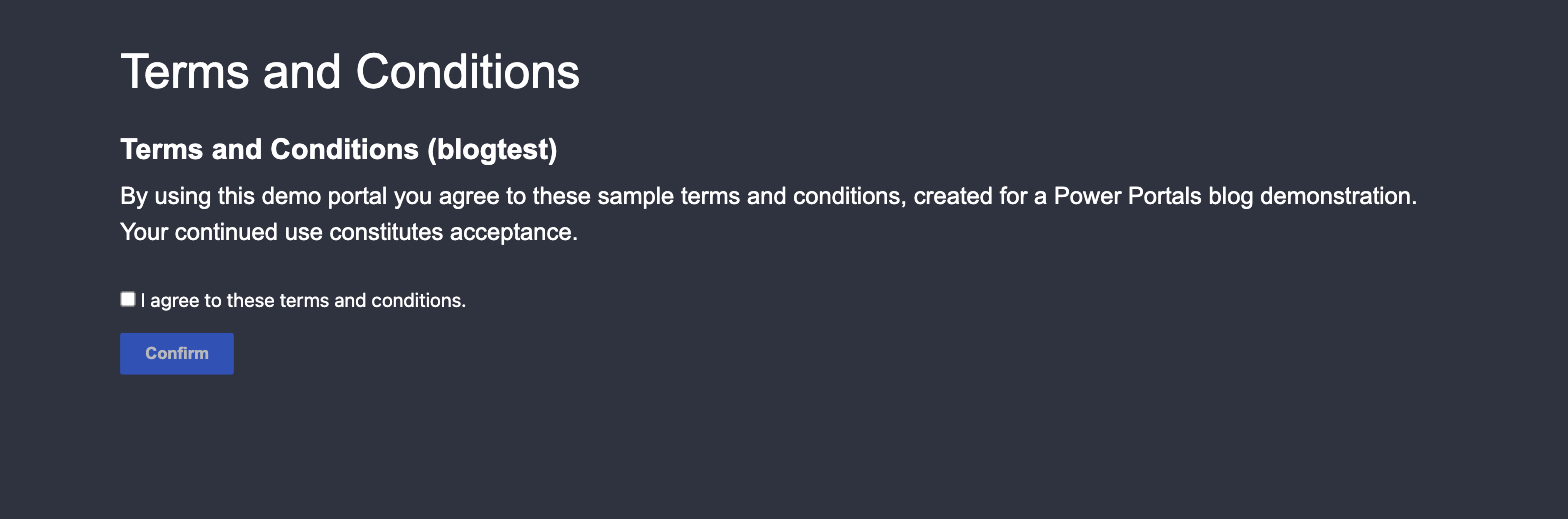
I reproduced exactly this in the demo portal: settings true, date in the past, contact's agreement date empty - and the page loaded with no dialog. Only after creating the Copy snippet did it appear:
Why the dialog still won't show for your test user
An observation from the hands-on that saves a lot of debugging time: the dialog is not an overlay that checks on every page load. It's served as its own page (/Account/Login/TermsAndConditions) during the sign-in flow, before authentication completes. The docs phrase it as "the next time they sign in".
Consequence: if you test with a user who is already signed in (from a session before you enabled the feature), nothing happens, no matter how often you reload. You have to sign out and back in for the check to run at all. That's the second silent trap next to the empty snippet.
The mechanism behind it
At sign-in, Power Pages compares the effective date with the contact's agreement date. The field on the contact is msdyn_portaltermsagreementdate (not adx_termsagreeddate, as in older sources). As a mechanism, inferred from the documented behavior:
- Agreement date empty or older than
TermsPublicationDate→ dialog appears - Agreement date newer or equal → no dialog
On confirmation, Power Pages writes the current timestamp to this field.
Updating terms and re-prompting
- Update the text in
Account/Signin/TermsAndConditionsCopy - Set
TermsPublicationDateto today's date (in the past, not the future) - Invalidate the cache
- All users whose
msdyn_portaltermsagreementdateis older are asked again on next sign-in
External identity providers
An honest note: on how this classic terms feature behaves with external identity providers (Entra External ID, Azure AD B2C), the current docs say nothing. If the login flow runs outside Power Pages and bypasses the portal /signin path, whether the check fires is an open question. Test it, don't assume it. Code-first sites also have a separate, own terms feature - don't confuse the two.
Go-live checklist
- □
Authentication/Registration/TermsAgreementEnabled=true - □
Authentication/Registration/TermsPublicationDate= valid past date (GMT) - □
Account/Signin/TermsAndConditionsCopyis not empty - □ To test: sign out and back in (the dialog fires at sign-in, not on page load)
- □ Contact field
msdyn_portaltermsagreementdateis empty or older than the effective date
If any one of these is off, the dialog stays away - silently.
Related articles
Power Pages authentication explained
OAuth 2.0, OpenID Connect, SAML, SSO and social login in Power Pages, the frame the terms dialog runs in at sign-in.
Read article → SecurityPower Pages security architecture
Table permissions, web roles and the hierarchical security model in detail.
Read article → SecuritySecurity and compliance in Power Pages
The wider frame of GDPR, privacy and governance that terms and conditions belong to.
Read article →Sources
- Microsoft Learn: Implement privacy protections – Agreeing to terms and conditions (site settings
TermsAgreementEnabled/TermsPublicationDate, the four content snippets, "Copy is empty by default") - Microsoft Learn: Contact table reference (field
msdyn_portaltermsagreementdate, Portal Terms Agreement Date) - Hands-on reproduction in the Power Portals demo portal (enhanced data model), including the silent failure on an empty Copy snippet and the sign-in trigger