Your filter works. It has worked for months. Then marketing creates a record called Newsletter #2 and the request comes back 400.
Nothing in your code changed. Nothing in Dataverse broke. The character did it.
Here is what happens, why the fix is two steps and not one, and which characters Microsoft documents for this problem and which it quietly leaves out.
The scenario
A Server Logic endpoint updates consent records. It looks up a Purpose by name before writing:
const filter = "msdynmkt_name eq '" + purposeName + "'";
const raw = Server.Connector.Dataverse.RetrieveMultipleRecords(
              "msdynmkt_purposes", "$filter=" + filter);
For most Purposes this is fine. For Commercial HLC #1 - DACH, status 400. For Newsletter Q4 #2, status 400. The pattern took a while to see because the test data was clean: every failing name contained a hash.
Why the hash is different
Every other special character in a URL causes trouble at the destination. The hash causes trouble before the request even leaves.
RFC 3986 defines # as the delimiter that starts the fragment identifier, and it is precise about what that means: "the fragment identifier is separated from the rest of the URI prior to a dereference, and thus the identifying information within the fragment itself is dereferenced solely by the user agent, regardless of the URI scheme."
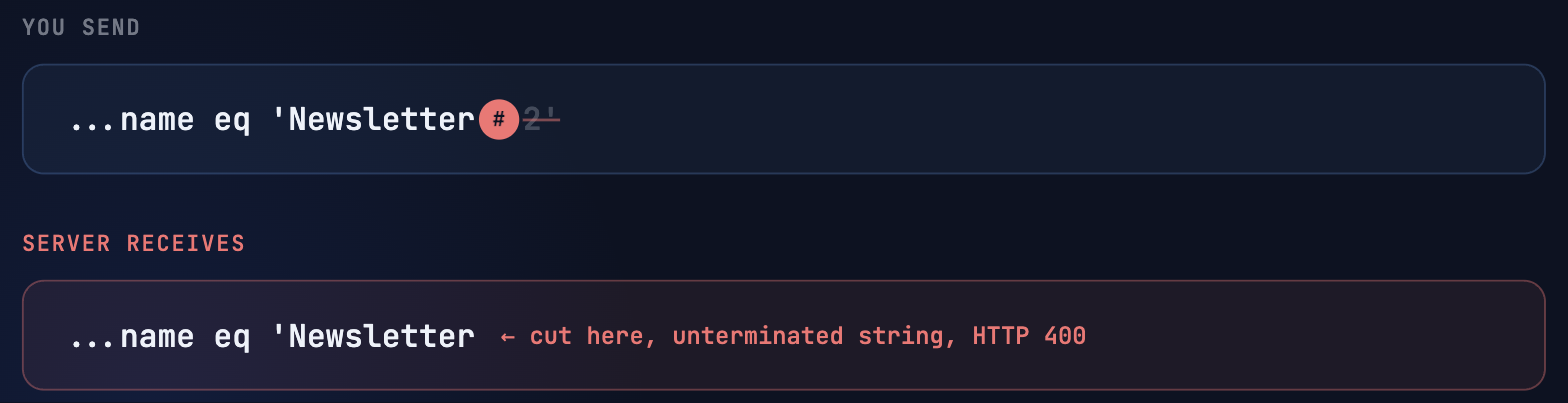
Separated prior to a dereference. The client cuts the URL at the hash and sends only what is to the left of it.
So this request:
GET /api/data/v9.2/msdynmkt_purposes?$filter=msdynmkt_name eq 'Commercial HLC #1 - DACH'arrives at the server looking like this:
GET /api/data/v9.2/msdynmkt_purposes?$filter=msdynmkt_name eq 'Commercial HLCThe string literal now has an opening quote and no closing quote. Dataverse parses it, fails, and returns 400.
That is the loud failure mode, and it is the lucky one.
Consider Campaign #2 Berlin used in a contains() filter. Truncate at the hash and what is left depends on the exact shape. If the hash sits in the middle of a string literal that is still open, the common case for a value like this, you get the same unfinished quote and the same loud 400 as above. I tested exactly this live on 3 September 2026: a test contact with # in the last name, the same unescaped contains() filter fired against /api/data/v9.2/contacts, result HTTP 400, "unterminated string literal"; properly encoded with %23, HTTP 200 with the single expected match. The real danger sits elsewhere: if the hash is no longer inside an open literal when the client truncates, say because the same query string carries an additional condition or a $select after it, you can be left with a filter that is valid on its own but incomplete. No error. HTTP 200. Just not the filter you wrote. In a consent or entitlement context, that is a considerably worse outcome than a 400, because nothing tells you it happened.
The reason your HTTP client does not protect you is that this is genuinely ambiguous. A hash in a URL is meaningful. The client cannot know whether you meant a fragment or a literal. Some libraries encode aggressively, some pass strings through untouched. The Dataverse connector in Power Pages Server Logic is in the second camp.
What Microsoft does document
More than you might expect, and with one significant hole.
Single quotes are documented. The Dataverse Web API filter guidance has a section called "Manage single quotes": "If the filter is for a single value, replace the single quote character with two consecutive single quote characters". The documented failure message is worth memorising because it names the position: "There is an unterminated literal at position 21 in 'lastname eq 'O'Bryan''".
Percent-encoding is documented, partially. The same page says that if a string value in a filter function includes a special character, you need to URL encode it, using contains(name,'+123') as the example that fails and contains(name,'%2B123') as the fix.
It then gives a table of characters to encode. Here is the complete list:
| Character | Encoded |
|---|---|
| $ | %24 |
| & | %26 |
| + | %2B |
| , | %2C |
| / | %2F |
| : | %3A |
| ; | %3B |
| = | %3D |
| ? | %3F |
| @ | %40 |
Ten characters. # is not one of them.
Neither is % itself, which is arguably worse. A percent sign inside a value that is not encoded to %25 corrupts every percent-triplet that follows it. A record named 50% Rabatt is a live grenade in a filter, and the documentation is silent on both.
So the two characters most likely to fail without an obvious error are exactly the two missing from Microsoft's table. That is the gap this post exists to fill.
The fix, in the right order
The tempting fix is a single replace on the hash. It works for the case in front of you and leaves the others.
The correct fix respects that there are two different layers of rules stacked on each other.
Layer one is OData. Inside a string literal, a single quote is doubled. That is the OData v4.01 URL conventions rule: "single quotes within string literals are represented as two consecutive single quotes". This has nothing to do with URLs.
Layer two is the URI. Reserved characters in the value get percent-encoded, per RFC 3986.
Apply them in that order, and one function handles everything:
function odataString(value) {
  // 1. OData layer: double the single quotes inside the literal
  const doubled = String(value).replace(/'/g, "''");
  // 2. URI layer: percent-encode everything reserved
  return encodeURIComponent(doubled);
}

const filter = "msdynmkt_name eq '" + odataString(purposeName) + "'";
The order is not a stylistic preference. It is load-bearing, and the reason is a nice coincidence in the JavaScript standard library.
encodeURIComponent escapes everything except A-Z a-z 0-9 - _ . ! ~ * ' ( ). The apostrophe is on the exempt list. So it encodes # to %23, % to %25, & to %26, + to %2B and ? to %3F, and it leaves your carefully doubled quotes exactly as ''.
Do it the other way round and the doubling produces literal quotes that then survive encoding anyway, but you have lost the guarantee that the doubling applied to the original value rather than to an encoded one. Double first. Encode second. Every time.
Note what is encoded and what is not. The quotes wrapping the literal are structure, so they stay bare. Only the value goes through the function. Encoding the whole filter expression breaks it, because eq, the spaces, and the quotes are syntax.
The OASIS specification has a worked example of exactly this principle. Categories('Smartphone%2FTablet') is valid while Categories('Smartphone/Tablet') is not, because forward slashes are read as path segment separators. The hash behaves the same way, one layer earlier.
Two traps nearby
Power Pages Liquid url_escape is not a substitute. The filter is documented as "URI-escape a string, for inclusion in a URL", and the doc's own example shows 'This & that//' becoming This+%26+that%2F%2F. Look at the spaces. It produces +, form-encoding style. Inside an OData string literal, + is a literal plus sign, not a space, so url_escape will silently change your search term. If you build filters in Liquid, this filter is the wrong tool.
Watch for double encoding. If you hand your already-encoded filter to a URL builder or an HTTP library that encodes query parameters again, %23 becomes %2523 and you are back to no matches. Encode once, at the value, and know where that happens in your stack.
Where this bites
Anywhere your filter values are not GUIDs.
Marketing-named records are the classic case, because the hash is a naming convention there: Newsletter #1, Campaign #DACH, Commercial #2. Generated identifiers are next: INV#2024-001, PO#88213. Then anything users type that ends up in a filter, which means categories, tags, project codes, and search boxes.
Search boxes deserve a specific mention. A user typing a hash into a search field is not exotic, and a search that returns silently wrong results is worse than one that errors.
A portal nobody is actively watching can return silently wrong data to users for months before anyone notices. That is precisely what monthly Care reviews are built to catch.
The rule that keeps you safe is simple. If a value in a filter is anything other than a GUID, it goes through the escape function. Write odataString once, put it where the team will find it, and use it everywhere.
While you are in the URL
Two documented limits worth knowing, since percent-encoding roughly triples the length of every character it touches.
Microsoft documents that "The maximum length of URL accepted by is 32 KB (32,768 characters)", rising to 64 KB inside a $batch body. And there is a tighter one that catches people first: "The maximum length of any individual segment in an OData request is 260 characters." A heavily encoded value can reach that faster than you would guess.
Neither limit causes the hash problem. Both can appear while you are fixing it.
The takeaway
Two rules, two layers, one function.
Double the single quotes, because OData says so. Percent-encode the value, because the URI says so. In that order, because encodeURIComponent leaves apostrophes alone and would otherwise let you fool yourself.
And keep in mind which failures are loud and which are quiet. The 400 that started this post is the friendly version. The one to fear is the truncated filter that still parses, returns 200, and hands you the wrong record.
Bugs like this cost a day the first time and five minutes every time after.
Weekly Coaching is my fixed-price format for building that reflex into a team: a recurring session each week, on your code, in your environment. The point is not that I fix it. The point is that the next one takes five minutes.
Weekly Coaching, fixed price, no surprisesRelated Articles
Power Pages Server Logic: 4 Hidden Constraints
The documented blocklist, four constraints found by bisection, and a debugging playbook for an opaque runtime.
Read article → DevelopmentLiquid FetchXML vs. Web API in Power Pages
A decision tree, performance comparison, and security patterns between the two data access paths in Power Pages.
Read article →Sources
- Dataverse Web API, filter rows, "Manage single quotes" and "URL encode special characters" with the ten character table
- Dataverse Web API, compose HTTP requests and handle errors, version v9.2, URL length and 260 character segment limits, error envelope
- Dataverse Web API service protection limits
- RFC 3986, section 3.5 on fragments, section 2.2 on reserved characters, section 2.1 on percent-encoding
- OData Version 4.01 Part 2, URL Conventions, string literals and percent-encoding
- MDN, encodeURIComponent and the characters it does not escape
- Power Pages Liquid filters, url_escape and xml_escape
- Power Pages Liquid template tags, {% fetchxml %}
- Server objects, Server.Connector.Dataverse