Server Logic went generally available on 6 April 2026. Microsoft describes the runtime as "native JavaScript code compliant with the ECMAScript 2023 standard".
Read that and you assume the obvious: whatever runs in Node runs here.
It does not. And when it does not, you get an HTTP 400 with no stack trace, no line number, and no clue. I spent several days in a production project last May writing code that was clean by every JavaScript convention and still got rejected. This is what I found by bisection, plus what Microsoft has since documented, and where the two do not agree.
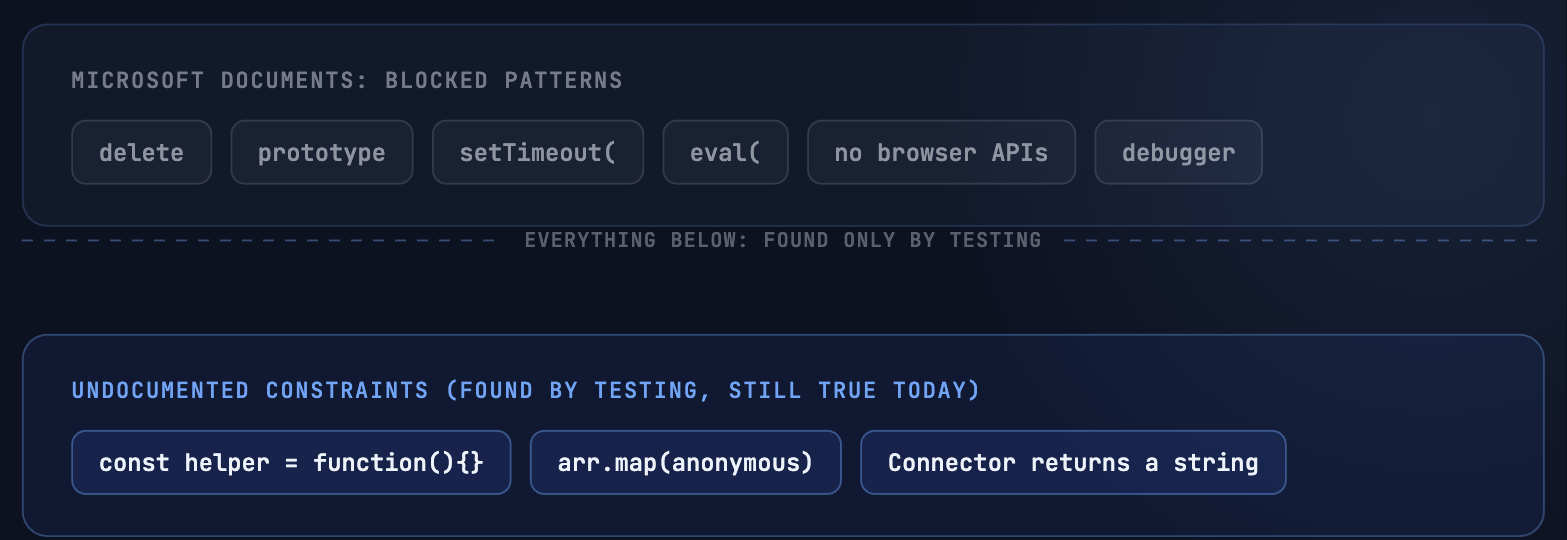
First: read the blocked pattern list
Before you debug anything, know that Microsoft publishes a list of patterns the platform rejects outright. The docs say the system "validates server logic scripts and rejects those that contain certain unsafe or restricted keywords".
The list is worth memorising because several entries are surprising:
__dirname, __filename, import(, import from, eval(, Function(, setTimeout(, setInterval(, setImmediate(, process.exit, process.kill, child_process, fs., require(, constructor.constructor, this.constructor, arguments.callee, with(, delete, Object.getPrototypeOf, Object.setPrototypeOf, Proxy(, Reflect., Symbol.for, __proto__, prototype, debugger
Three of those will bite ordinary code.
delete is blocked as a keyword. That is why the DELETE handler is not function delete() but function del(). Microsoft's own tutorial carries the comment "delete keyword should not be used in script file." It also means delete obj.someKey is off the table. Use obj.someKey = null instead.
prototype is blocked as a substring. Any library or helper that touches Foo.prototype.bar is dead on arrival.
setTimeout( and friends are blocked. There is no delay primitive. Every retry-with-backoff pattern you have ever written is impossible here, and Microsoft does not call this consequence out anywhere.
Also documented: no browser APIs. The docs are explicit that Server Logic "doesn't support browser-based APIs or libraries. Examples include fetch, XMLHttpRequest, and other DOM-related features." For outbound calls you use Server.Connector.HttpClient instead.
That list explains a good share of mysterious 400s. It does not explain the four below.
The four constraints
Everything in this section was found empirically, by bisection, in May 2026, on a live site. None of it appeared in the blocked pattern list or anywhere else on Microsoft Learn at the time. Treat it as field observation, not documentation, and retest in your own environment before you build around it — constraint 3 has since demonstrably changed, more on that below. Constraints 1 and 2 were retested live on 3 September 2026 and still reproduce exactly as described, same HTTP 400, same "Exception occurred while processing this request" error text.
| Pattern | Result |
|---|---|
Module-level const holding a function expression |
HTTP 400 |
| Array methods with an anonymous callback (map, filter, sort, forEach) | HTTP 400 |
| Server.Logger.Warn(...) and Server.Logger.Error(...) | HTTP 400 in May 2026, confirmed fixed in September 2026 |
| Server.Connector.Dataverse.* return value | String, not object |
Constraint 1: function expressions in a const
// Rejected
const helper = function (x) { return x * 2; };
function get() { return JSON.stringify({ result: helper(5) }); }

// Accepted
function get() {
  function helper(x) { return x * 2; }
  return JSON.stringify({ result: helper(5) });
}
A function declaration nested inside get() runs. A function expression assigned to a const does not, wherever you put it.
The practical cost is real: helpers have to be duplicated inside get() and put(). It is ugly. It is also the only shape I got to run reliably.
Constraint 2: anonymous callbacks on array methods
// All three rejected
const doubled  = arr.map(function (x) { return x * 2; });
const filtered = arr.filter(function (x) { return x > 0; });
const sorted   = arr.slice().sort(function (a, b) { return a - b; });
forEach too. That is the standard toolkit gone.
The workaround is classical loops, and because sort(callback) is affected as well, sorting means doing it by hand:
function get() {
  const items = [];
  for (let i = 0; i < records.length; i++) {
    if (!records[i].isActive) continue;
    items.push({ id: records[i].id, order: records[i].sortOrder });
  }

  for (let i = 0; i < items.length; i++) {
    for (let j = i + 1; j < items.length; j++) {
      if (items[i].order > items[j].order) {
        const tmp = items[i]; items[i] = items[j]; items[j] = tmp;
      }
    }
  }
  return JSON.stringify({ items: items });
}
Why? My working hypothesis, and it is only that, is that the sandbox treats anonymous function expressions passed as arguments as untrusted code. It fits the pattern in constraint 1 and it fits the spirit of the blocked list, which is full of reflection and dynamic-evaluation entries. Microsoft has published nothing on the subject.
Constraint 3: Logger.Warn and Logger.Error — since fixed
Server.Logger.Log(...) worked fine in May 2026. Server.Logger.Warn(...) and Server.Logger.Error(...) both returned 400 back then.
The workaround at the time was to fold the severity into the message:
Server.Logger.Log("WARN: Dataverse returned a non-success status");
Server.Logger.Log("ERROR: update failed: " + err.message);
Update, 3 September 2026: I retested all three methods live, against a freshly created server logic endpoint on the demo portal, with exactly this code:
function get() {
  Server.Logger.Log("log-ok");
  Server.Logger.Warn("warn-ok");
  Server.Logger.Error("error-ok");
  return JSON.stringify({ status: "success" });
}
Result: HTTP 200, all three calls ran without a crash. Microsoft's Server objects reference now also documents all three, Log, Warn and Error, with a plain code sample. What was a real constraint in May is a resolved issue today — still worth a quick test in your own environment if you are on an older site version. The workaround pattern above is harmless either way.
Nobody told me this got fixed between May and September. I only found out because I happened to retest it for this post. That gap, changes to the platform landing quietly while you are busy shipping, is exactly what Care exists to close: a monthly check against what Microsoft actually shipped, not a hope that you'll notice.
A related gap worth knowing: the Logger documentation points at the DevTools extension as the place to view messages, but that article does not mention Server Logic at all. Where your log output actually surfaces is, as of today, undocumented.
Constraint 4: the Dataverse connector returns a string
The documentation shows a response shape:
{
  "StatusCode": 204,
  "Body": "",
  "IsSuccessStatusCode": true,
  "ReasonPhrase": "No Content",
  "ServerError": false,
  "ServerErrorMessage": null,
  "Headers": { }
}
What it does not say anywhere in prose is the return type. In practice you get that shape as a serialised string, and Body inside it is a string as well. So a single record read needs two parses:
function get() {
  function parseConnector(response) {
    if (typeof response === "string") {
      try { return JSON.parse(response); } catch (e) { return null; }
    }
    return response;
  }

  const raw     = Server.Connector.Dataverse.RetrieveMultipleRecords("contacts", "$top=10");
  const wrapper = parseConnector(raw);
  if (!wrapper || !wrapper.IsSuccessStatusCode) {
    Server.Logger.Log("ERROR: connector status " + (wrapper && wrapper.StatusCode));
    return JSON.stringify({ items: [] });
  }
  const data = JSON.parse(wrapper.Body);
  return JSON.stringify({ items: data.value });
}
Microsoft's own client-side sample does the same double parse, JSON.parse(res.data) and then JSON.parse(p.Body), which is the closest thing to confirmation you will find.
Two smaller traps in the same area. The connector expects the EntitySetName, not the table name: accounts, not account. And the client response envelope is documented with a capital Data while the sample code reads res.data. Defend against both: const payload = res.data || res.Data;
How to debug an engine that will not talk to you
There is no error-handling documentation for Server Logic. No status code table, no error code list, no troubleshooting article. The string "Exception occurred while processing this request" appears nowhere on Microsoft Learn. You are on your own, so build your own instrumentation.
Bisect. Start with an endpoint that returns a constant. Add one construct at a time. The moment the 400 appears, the last thing you added is the culprit. Tedious, and it is the only method that works against a silent validator.
Stamp a marker. Put a version marker in every response. Caching and deployment timing will otherwise have you debugging code that is not running.
return JSON.stringify({ marker: "v7", items: items });Use the stages pattern. Wrap each step in its own try/catch and collect results instead of letting one failure take down the endpoint.
function get() {
  const stages = {};
  try { stages.user = Server.User && Server.User.fullname; }
  catch (e) { stages.user_err = e.message; }

  try {
    const r = Server.Connector.Dataverse.RetrieveMultipleRecords("contacts", "$top=1");
    stages.connectorType  = typeof r;
    stages.connectorFirst = String(r).substring(0, 200);
  } catch (e) { stages.connector_err = e.message; }

  return JSON.stringify({ marker: "diag-v1", stages: stages });
}
This is the single highest-value habit for an opaque runtime. It turns a binary 400 into a readable report.
Introspect types. Dump typeof, Object.keys() and the first 200 characters of anything the platform hands you. That is exactly how the string return in constraint 4 revealed itself.
Warning: One more thing you should know before you assume everything is your fault: there is a tenant-level governance control that blocks outbound HTTP from Server Logic entirely. When an admin enables it, any script attempting an outbound call "returns an HTTP 403 Forbidden response instead of executing the call", immediately, without redeployment. If your external calls started failing overnight and nothing in your code changed, check that setting before you bisect anything.
What to take away
Server Logic is a genuinely useful addition. Running JavaScript server-side, hidden from the browser, governed by web roles and table permissions, closes a real gap in Power Pages. I use it.
But "ECMAScript 2023 compliant" is a description of the language, not a promise about the sandbox. The blocked pattern list is documented and you should read it before your first line of code. Beyond that list there is a second layer of behaviour that is not documented at all, and the runtime's only way of telling you about it is a 400 with an empty body.
Write defensively. Instrument from the first commit. Bisect when it goes quiet. And re-test the undocumented constraints periodically, because a platform this young moves.
Fighting a runtime that will not explain itself?
Weekly Coaching is my fixed-price format for exactly this kind of work: a recurring session each week, in your environment, on your code. We debug together and your team keeps the method, not just the fix.
Weekly Coaching, fixed price, no surprisesRelated Articles
The Render-Mutate-Refresh Pattern
Liquid and Server Logic combined into one pattern for data-bound, user-specific components in Power Pages.
Read article → DevelopmentLiquid FetchXML vs. Web API in Power Pages
A decision tree, performance comparison, and security patterns between the two data access paths in Power Pages.
Read article →Sources
- Server logic overview, ECMAScript 2023 wording, supported HTTP methods, site settings and timeout
- Create and manage server logic, blocked keyword list, limitations, CSRF token, response envelope
- Server objects reference, Server.Logger, Server.Connector.Dataverse, Server.User, Server.Context
- Server logic Dataverse operations tutorial, del() comment and double parse sample
- Debug server logic, mocked objects in the local debugger
- Disable external service calls, tenant governance control and HTTP 403
- Release plan entry, public preview October 2025 and general availability April 2026
- General availability announcement
- DevTools extension, referenced by the Logger docs