You are building a component in Power Pages. It has to do three things at once.
Render fast, with no spinner. Stay secure, so a user only ever sees and touches their own data. Update without a page reload, because a toggle that reloads the page is not a toggle.
Pick one tool and you give up one of the three. This post is about not giving any of them up.
Why one tool is never enough
Pure Liquid renders on the server. Microsoft states it directly: Liquid "is processed on the server side, so the output is rendered as plain HTML to the end user". Your data arrives inside the first byte of HTML. Fast, and safe on the read side, because table permissions apply. What Liquid cannot do is enforce anything about a write, because by the time the user clicks, Liquid is long finished.
Pure client-side Web API gives you writes and updates without reloads. The price is a blank component until the first response lands, plus you have to enable the Web API on the table with Webapi/<table name>/enabled and list the columns in Webapi/<table name>/fields. That opens a door that stays open for every script on your site.
Basic forms are secure and configuration-driven. They are also not a toggle. Add custom JavaScript to a form field and Microsoft warns you will get an "Invalid postback or callback argument" message on submission, which tells you most of what you need to know about the interaction model.
So: three tools, three jobs.
| Operation | Mechanism | Why |
|---|---|---|
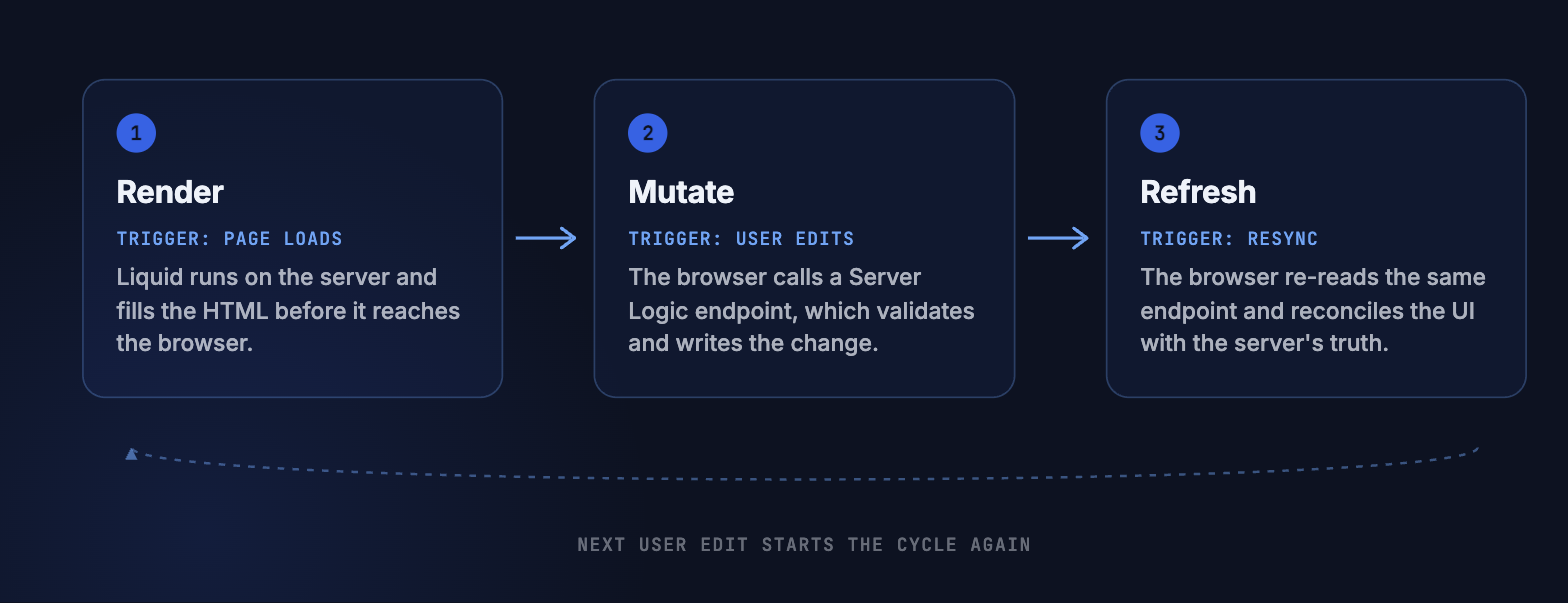
| Initial render | Liquid fetchxml, server side | Data arrives inside the HTML, no spinner |
| Mutation | Server Logic over AJAX | Validation the client cannot bypass |
| Resync | Explicit refresh to a Server Logic GET, rebuild the DOM | Reconciles optimistic UI with reality |
I call it Render-Mutate-Refresh. It came out of a consent management cockpit, but nothing about it is specific to consent. It fits any component that is data-bound, user-specific, and mutable in place.
Layer 1: render with Liquid
{% fetchxml preferences %}
<fetch>
  <entity name="my_userpreference">
    <attribute name="my_topic"></attribute>
    <attribute name="my_value"></attribute>
    <attribute name="my_userpreferenceid"></attribute>
    <filter>
      <condition attribute="my_contactid" operator="eq" value="{{ user.id }}" />
    </filter>
  </entity>
</fetch>
{% endfetchxml %}

{% for item in preferences.results.entities %}
  <div class="pref-item"
       data-id="{{ item.my_userpreferenceid }}"
       data-topic="{{ item.my_topic | escape }}"
       data-checked="{{ item.my_value.Value }}">
    <span class="pref-label">{{ item.my_topic | escape }}</span>
  </div>
{% endfor %}
Two syntax notes that cost people an afternoon each.
Results live under results.entities, not directly on the variable. And do not use self-closing tags for attributes. Microsoft says it explicitly: instead of <attribute name="title"/>, write <attribute name="title"></attribute> with an explicit closing tag. The <condition> element is fine self-closed, but attributes are not.
user.id is the documented property. The user object is an entity object, and the entity object documents ID as "The GUID ID of the table, as a string". You will see user.contactid in a lot of community code and it works through the general "any attribute by logical name" rule, but user.id is the one Microsoft actually names.
Why this is secure: the filter is written server-side, in a template the browser never sees. The browser receives rendered rows and nothing else. There is no client-side filter to tamper with, because there is no client-side query.
Layer 2: mutate with Server Logic
Reads go through Liquid. Writes go through a server endpoint that the client cannot argue with.
Client side:
function onToggle(recordId, topic, newValue) {
  shell.getTokenDeferred().done(function (token) {
    $.ajax({
      type: "PUT",
      url: "/_api/serverlogics/preference-update",
      headers: { "__RequestVerificationToken": token },
      contentType: "application/json",
      data: JSON.stringify({ id: recordId, topic: topic, value: newValue })
    })
    .done(function () { /* keep the optimistic state */ })
    .fail(function () { revertToggle(recordId); });
  });
}
The URL pattern is documented: https://<site-url>/_api/serverlogics/<server-logic-name>. So is the requirement that "All server logic API calls must include a Cross-Site Request Forgery (CSRF) token."
Note: The Server Logic docs reference a shell.safeAjax method, but the wrapper Microsoft actually publishes is webapi.safeAjax, built on shell.getTokenDeferred(). If shell.safeAjax is undefined in your site, that is why, confirmed live on the demo portal: shell exposes ajaxSafePost, getTokenDeferred and refreshToken, no safeAjax. Use the documented wrapper or call getTokenDeferred directly as above.
Server side, the endpoint enforces what the browser cannot:
function put() {
  const user = Server.User;
  if (!user) {
    return JSON.stringify({ ok: false, error: "Authentication required" });
  }

  const payload = JSON.parse(Server.Context.Body);

  // Whitelist. Never trust a topic name off the wire.
  const allowed = ["newsletter", "product-updates", "events"];
  let permitted = false;
  for (let i = 0; i < allowed.length; i++) {
    if (allowed[i] === payload.topic) { permitted = true; }
  }
  if (!permitted) {
    Server.Logger.Log("WARN: rejected topic " + payload.topic);
    return JSON.stringify({ ok: false, error: "Unknown topic" });
  }

  const body = JSON.stringify({ my_value: payload.value ? 1 : 0 });
  const raw  = Server.Connector.Dataverse.UpdateRecord(
                 "my_userpreferences", payload.id, body);

  return JSON.stringify({ ok: true, marker: "put-v3", raw: String(raw) });
}
Server.Context.Body is the documented way to read the raw HTTP request body. Server.User is documented as returning null for anonymous callers, which makes the guard at the top meaningful rather than decorative.
Splitting read and write across two mechanisms buys you something specific: you never have to enable the Web API on that table. The write path is a named endpoint with your validation in it, gated by web roles, and there is no generic CRUD surface for anyone to discover.
Layer 3: refresh on demand
Optimistic UI is excellent right up to the moment it is wrong. A second tab, a background flow, a colleague with delegated access, and the screen is lying.
So give the user a way to resync, and use the same Server Logic endpoint family:
function refresh() {
  shell.getTokenDeferred().done(function (token) {
    $.ajax({
      url: "/_api/serverlogics/preferences-list",
      headers: { "__RequestVerificationToken": token }
    }).done(function (response) {
      const payload = response.data || response.Data;
      const items   = JSON.parse(payload).items;
      rebuildDom(items);
    });
  });
}
Note the defensive response.data || response.Data. Microsoft documents the response envelope with a capital Data and shows lowercase data in the client sample. Handle both and move on.
The permission discipline this pattern demands
Here is the part that decides whether this pattern is safe or a liability, and it has nothing to do with code.
Layer 1 requires Read permission on the table for the signed-in user's web role. Table permissions are not scoped to a template. Microsoft is explicit that access to Dataverse records is restricted "when using forms, lists, Liquid, the Portals Web API, and other components accessing Dataverse tables". The same Read that lets your Liquid template query the table lets every list, every basic form, and every Web API call on your site query it too.
If your Liquid filter is the only thing keeping users apart, then Read at Global scope is a single misconfigured list away from being a data leak. Microsoft's Site Checker exists partly to catch this, flagging table permissions "assigned to the Anonymous web role that expose unintended data".
Two ways to be safe.
Prefer a narrower scope. Contact scope applies the permission only to records associated with the signed-in user. If your data model supports it, use it, and let the platform enforce the isolation instead of your template. Then your Liquid filter is an optimisation rather than a security control.
If you must use Global scope, treat it as a standing commitment. Every component that touches that table becomes part of your security surface. Write it down in the solution documentation, and audit it whenever anyone adds a list.
While you are there: gate the UI with the permissions the platform already knows about. The Liquid entity permissions object is documented and gives you can_read, can_write, can_create, can_delete, can_append, can_append_to, plus rules_exist. Rendering a toggle only when can_write is true means the UI and the enforcement agree, which spares your users a lot of failed writes.
What this costs you
Be honest with yourself about the trade-offs before you commit.
Two renderers for one component. Liquid builds the DOM on first paint. JavaScript rebuilds it after a refresh. That is the same markup expressed twice, and it will drift. Keep both in one file and review them together.
Two query languages. Liquid uses FetchXML. Server Logic uses OData. Two dialects, two escaping regimes, one component.
Refresh is a UX commitment. A button labelled "Refresh" makes users wonder when they are supposed to press it. Either automate it on a sensible trigger, such as window focus, or label it in a way that answers the question.
Liquid is not free. Microsoft's own performance guidance warns that "Loading large numbers of related entities, or accessing large numbers of relationships in a single template, can have a negative impact on template rendering performance." Server-side rendering moves the wait, it does not delete it.
An update worth knowing about
Since this pattern was first written down, Microsoft added a {% serverlogic %} Liquid tag that invokes Server Logic during page render. The docs note that this server-side invocation "doesn't require a client-side HTTP request or Cross-Site Request Forgery (CSRF) token".
That is a genuine third option for layer 1. If your read logic is complicated enough that FetchXML in a template gets unpleasant, you can now render through Server Logic and keep the instant-paint property. The same docs add the obvious warning: long-running Dataverse or external calls in that tag increase page response time directly, because the page is waiting on them.
The pattern does not change. The Render layer just gained an implementation choice.
When to use it, and when not to
Use Render-Mutate-Refresh when the component shows user-specific state, the user can change it without leaving the page, the data matters enough that client-side filtering is not acceptable, and first paint is visible to someone who cares.
Do not use it when the component is read-only, because plain Liquid is simpler and simpler wins. Or when it is a single submit, because a basic form is less code and less risk. Or when the data changes constantly from outside, because then you are building a real-time application and Power Pages is the wrong shape for it.
Getting this boundary wrong is exactly the kind of decision worth pressure-testing before you build, not after. That is what an Architecture Workshop is for.
Implementation checklist
- Identify the table that holds the user-specific state
- Choose the narrowest table permission scope the data model allows
- Audit every existing list, form and Web API setting on that table before you add Read
- Build the Liquid template with the user filter written server-side
- Add a Server Logic record with get() and put(), and assign web roles to it
- Match the Server Logic web roles to the table permission web roles
- Gate the mutable UI on the Liquid permissions object
- Implement optimistic update, then revert on failure
- Add the refresh trigger and decide whether it is manual or automatic
- Document the permission commitment where the next developer will find it
Before you widen a table permission, know what else is standing on it.
The Security Audit is my fixed-price review of exactly this surface: table permissions, web roles, lists, forms, Web API settings and what an anonymous visitor can actually reach. You get a findings report with severities, not a feeling.
Security Audit, from a fixed price, with a written findings reportRelated Articles
Power Pages Server Logic: 4 Hidden Constraints
The documented blocklist, four constraints found by bisection, and a debugging playbook for an opaque runtime.
Read article → DevelopmentLiquid FetchXML vs. Web API in Power Pages
A decision tree, performance comparison, and security patterns between the two data access paths in Power Pages.
Read article →Sources
- What is Liquid, server-side processing
- Liquid template tags, fetchxml syntax, results.entities, self-closing tag caveat
- Available Liquid objects, user, entity object, permissions object, performance note
- Power Pages security overview, Liquid protected by table permissions
- Set table permissions, access scopes
- Web API overview, Webapi/<table>/enabled and fields site settings
- Portal Web API how-to, shell.getTokenDeferred() and __RequestVerificationToken wrapper
- Server logic overview, endpoint URL pattern, CSRF requirement, web roles
- Create and manage server logic, role assignment, response envelope, serverlogic tag
- Server objects, Server.Context.Body, Server.User, Server.Connector.Dataverse
- Add custom JavaScript to a form, invalid postback warning
- Site Checker configuration issues