In the previous post I read a many-to-many relationship with Liquid FetchXML. That works, but the data is fetched at page render: it is preloaded whether the visitor ever looks at it or not.
Sometimes you want the opposite: fetch the linked records on demand, when the user expands a row or opens a detail panel, without a full page reload and without exposing the query in the browser. That is what Server Logic is for. And it answers a question the FetchXML post left open: can a server-side call read N:M through $expand, the convenient path the portal Web API stumbles on? I tested it live. It can.
What Server Logic is
Server Logic lets you run JavaScript on the server as part of the site runtime. It has been generally available since April 2026 (public preview since October 2025). The code and its configuration are stored in Dataverse, so it moves through your solutions and pipelines like any other Power Pages component.
Two properties matter for this use case:
- It runs server-side, so the browser never sees the query or the connection. You author native JavaScript (ECMAScript 2023) without browser APIs: no DOM, no
fetch, noXMLHttpRequest. - It is governed by web roles and table permissions, exactly like the rest of the portal. It is not an elevated backdoor. More on that below, because it is the part people get wrong.
You author it in the design studio under Set up, Server logic, then edit the code in Visual Studio Code, which gives you IntelliSense and compile-time checks. Each HTTP method maps to a function you define: get(), post(), put(), patch(), del().
Reading N:M from Server Logic
Inside get(), you talk to Dataverse through the Server.Connector.Dataverse object. RetrieveMultipleRecords takes the entity set name and an OData options string:
function get() {
  try {
    var options =
      "$select=pwrprtl_installation_name" +
      "&$expand=pwrprtl_installation_product($select=pwrprtl_product_name)";
    return Server.Connector.Dataverse.RetrieveMultipleRecords(
      "pwrprtl_installations",
      options
    );
  } catch (err) {
    Server.Logger.Error("GET failed: " + err.message);
    return JSON.stringify({ status: "error", message: err.message });
  }
}
The Microsoft docs only show $select and $top for this method. Whether $expand across an N:M navigation property works is not documented, so I built exactly this in the demo portal (the same two custom tables Installation and Product with an N:M relationship from the last post) and called it.
It returns the nested collection cleanly:
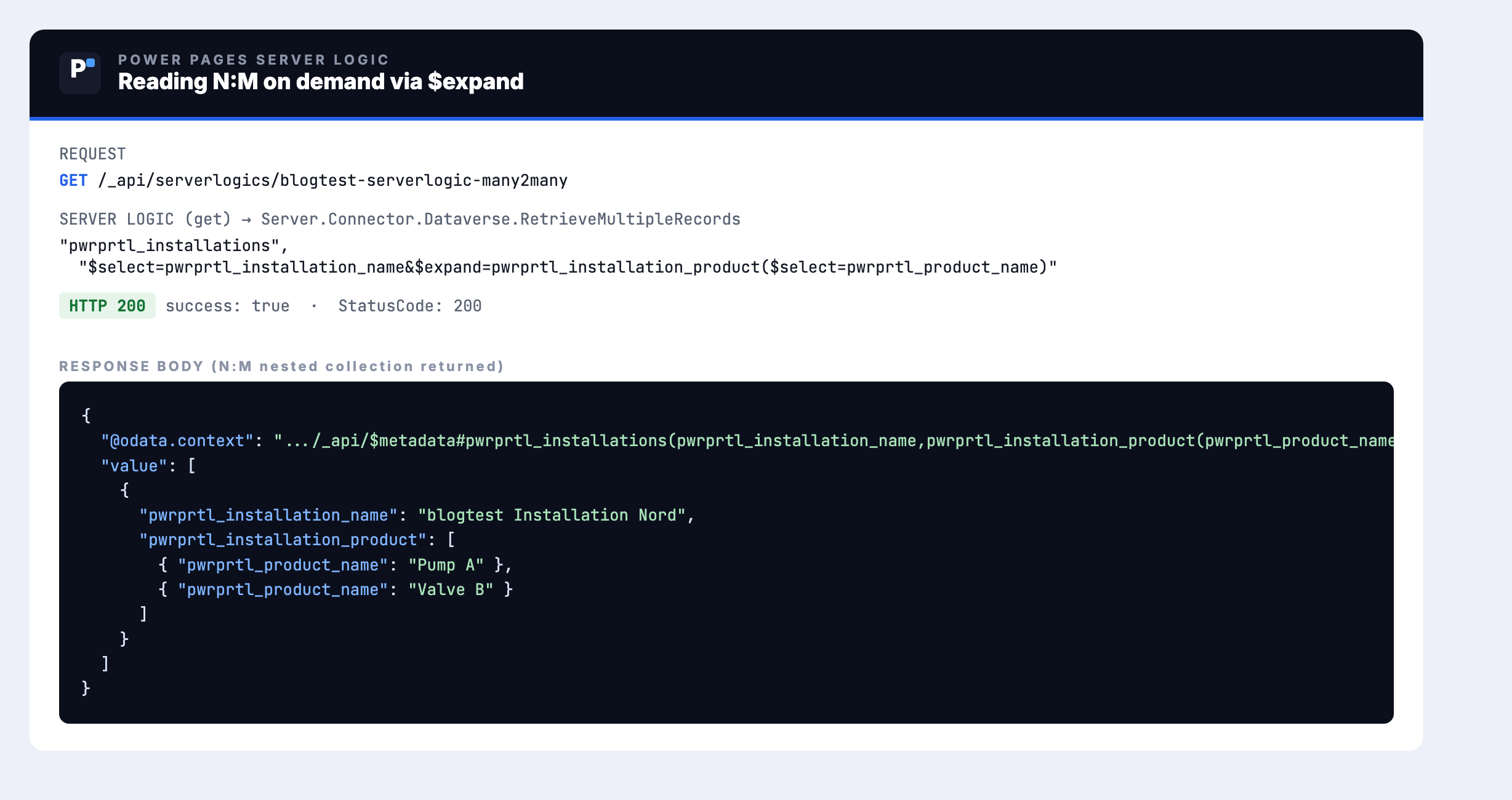
One installation, its two linked products (Pump A, Valve B), nested under pwrprtl_installation_product, in a single call. This is the convenient read the portal Web API documents as hitting a Known Issue under Contact and Account permission scopes. Server Logic issues the query through the server-side Dataverse connector rather than the portal Web API request pipeline, so that particular issue is out of the picture.
Calling it from the page, on demand
The client calls the logic by name at /_api/serverlogics/<name>. Use the portal's safeAjax wrapper so the anti-forgery token is attached:
webapi.safeAjax({
  type: "GET",
  url: "/_api/serverlogics/installation-products",
  contentType: "application/json",
  success: function (res) {
    // res.data holds the server logic response; parse and render
  }
});
You wire that to a row-expand handler or a detail button. Nothing about the query lives in the browser: the client sees a named endpoint and a result, not the table names or the options string. (You can also invoke logic from Liquid with the {% serverlogic %} tag, but that runs during page render and reintroduces the preloading you were trying to avoid.)
Security: permission-bound, and authorization is your job
Server Logic runs inside the caller's security context and respects their web role and table permissions. That has a comfortable side and a sharp side.
The comfortable side: an unauthenticated visitor, or one whose web role lacks read permission on the involved tables, gets nothing back. The empty-result trap from the FetchXML post applies here too, so if the call returns nothing, check who the page is running as before you debug the code.
The sharp side: permission-bound is not the same as safe. The moment you accept a parameter from the client, for example an entity set name or a record id, you own the authorization decision. Validate every input, never pass client-supplied values straight into a query, and enforce table permissions (or an equivalent check) for the specific records being touched. Server-side does not mean trusted-by-default.
Limits worth knowing before you commit
- No
fetch,eval,require, and other unsafe patterns are blocked. For external systems you use the providedHttpClient, and an admin can switch external HTTP calls off entirely. - Execution has a timeout: 120 seconds by default, 240 seconds maximum. Server Logic is for focused operations, not long batch jobs.
- Calling logic from Liquid with
{% serverlogic %}extends the page render, which defeats the on-demand goal. Keep it to client calls when you want responsiveness.
Which way for which job
| Task | Recommended way |
|---|---|
| Read N:M, list visible at page load | Liquid FetchXML (link-entity / intersect) |
| Read N:M, on demand (row expand, detail panel) | Server Logic + Server.Connector.Dataverse ($expand) |
| Write N:M (associate / disassociate) | Portal Web API $ref (POST / DELETE) |
| Read 1:N / N:1 | Portal Web API $expand (one level) or Liquid |
FetchXML and Server Logic are not competitors so much as two timings of the same read: preloaded versus on demand. Pick by when the user actually needs the data, and keep the authorization discipline the same for both.
Related articles
Reading N:M: Web API vs. FetchXML
The predecessor: what the portal Web API can do with N:M, and the Liquid FetchXML workaround.
Read article → DevelopmentLiquid FetchXML vs. Web API
The fundamental comparison of the two data-access paths: decision tree, performance, security.
Read article → SecurityPower Pages security architecture
Table permissions, web roles and scopes: the model behind the authorization point in this post.
Read article →Sources
- Microsoft Learn: Server logic overview (general availability, API URL, HTTP method to function mapping, "protected by web roles and table permissions")
- Microsoft Learn: Server objects (
Server.Connector.Dataverse.RetrieveMultipleRecords) - Microsoft Learn: Interact with Dataverse tables using server logic (the method skeleton and the safeAjax client call)
- Microsoft Learn: Author server logic (limitations: no fetch/eval, timeout, blocked patterns)
- Microsoft Learn: Overview of the portals Web API (the N:M GET Known Issue and the FetchXML workaround)
- Hands-on in the Power Portals demo portal: a Server Logic reading the N:M relationship via
$expand, verified live (HTTP 200, nested related records returned)