On 14 August 2026, Microsoft updated the Power Pages deprecations article. One new entry affects every site that uses the portal Web API.
The facts, in two lines:
From August 2026, newly created websites can no longer use the wildcard value * in the Webapi/<table-name>/fields site setting.
On 14 September 2026, support for the wildcard value is removed for all websites. Existing sites must use an explicit list of allowed columns.
That is four weeks from the day this post goes out. The self check takes ten minutes per site, that number holds because the steps are always the same. How long the fix takes afterward depends on your site, on how many tables are affected, and on how much custom code sits on top of those Web API calls. What reliably costs time either way is not the change itself, it is finding every place that needs it, and that is what this post is about.
What the setting actually does
The portal Web API is enabled per table through two site settings:
| Site setting | Meaning |
|---|---|
| Webapi/<table-name>/enabled | Turns the Web API on for this table. Default is False. |
| Webapi/<table-name>/fields | Comma separated list of columns reachable through the Web API. Mandatory setting. |
The table name in the setting is the logical name, so account or incident. The URL of the call uses the EntitySetName in plural, so /_api/accounts or /_api/incidents. Keep that distinction in mind while you clean up, because you search the site settings for one and your JavaScript for the other.
Until now, * was a valid value for fields. It means every column. Convenient while building, and that is precisely the problem. Microsoft puts it plainly: the wildcard value exposes all columns in a Dataverse table through the Power Pages Web API.
What breaks on 14 September
Anything that hits /_api/ for a table whose fields setting is *. Where exactly that happens on your site is not something I can know from here, it depends on your implementation and your custom code. The four categories below are examples, not a complete list, meant to give you a starting point when you search. The call could just as easily live in a React component, a web template, or a multistep form configuration nobody remembers writing. The third category below is the one teams forget most often:
1. Custom JavaScript on forms
The classic case is a basic form with a script that loads extra data on render or writes a second record on submit. Breaks immediately, because the call fails.
2. Buttons and actions on lists
A custom button that flips a status, clones a record, or triggers an approval step. Same API, same setting.
3. Whatever happens quietly after submit
Follow-up writes, calculations, record associations. The user sees the success message from the form, the silent follow-up never happens. The nastiest category, because it does not show up as an error, it shows up as a missing record three weeks later.
4. Third party components and PCF controls
Anything you did not write yourself that talks to the portal Web API. Check the site settings, not the origin of the code.
Server side integrations against the Dataverse Web API at /api/data/v9.2/ are not affected. Different interface, different permission model. Only the portal path /_api/ is affected.
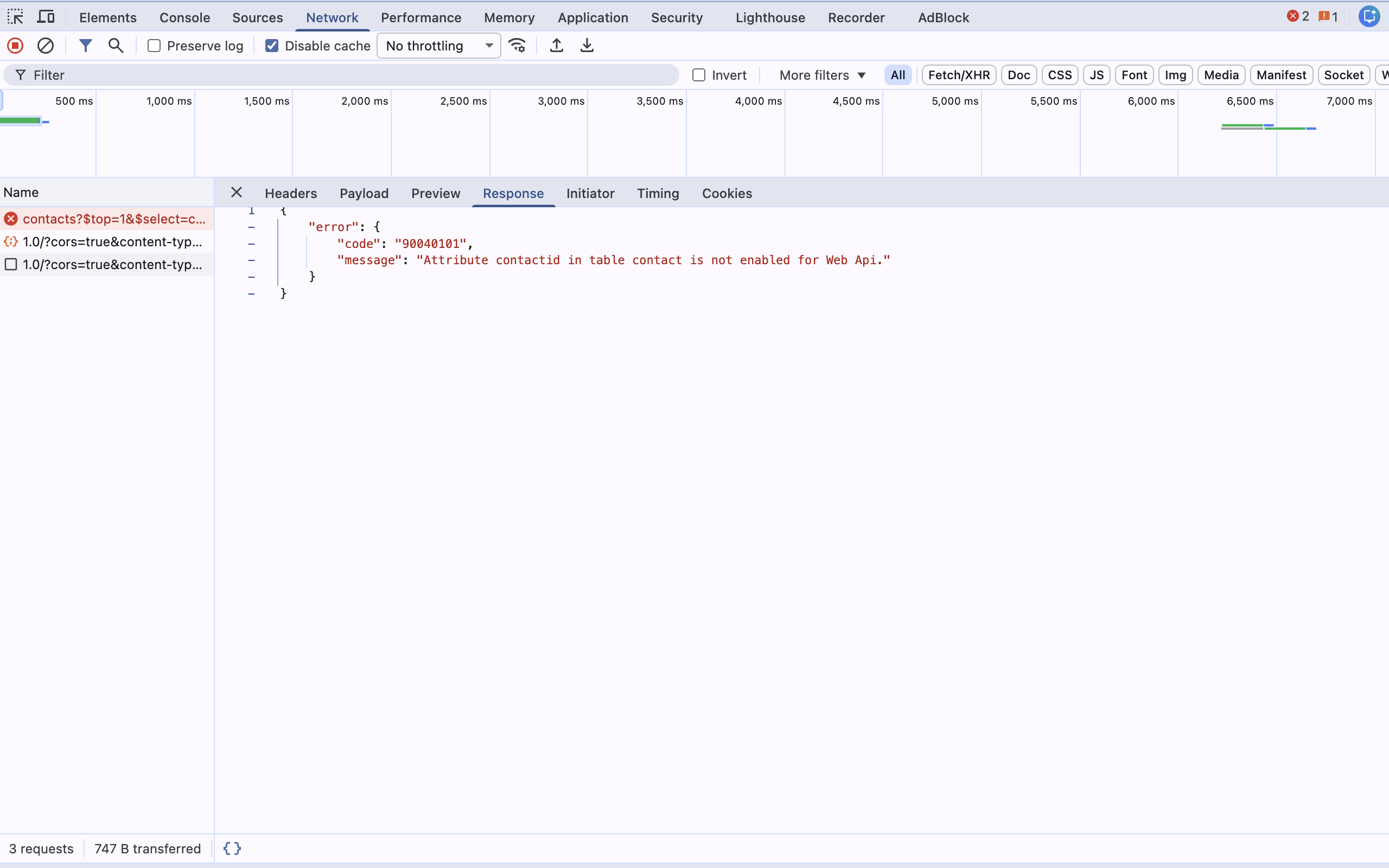
Here is what the failure actually looks like. On the demo site I removed the fields setting and repeated the same call: HTTP 403, error code 90040101, message "Attribute contactid in table contact is not enabled for Web Api." (the named column changes depending on which one the call requests). That is the documented case of a missing setting. The wildcard case after 14 September very likely looks the same, though not guaranteed, since both cases boil down to the same thing: no column in the response is on the permitted list.
Hands on: wildcard versus explicit column list
You can make the difference visible in a few minutes. The walkthrough below is written so you can reproduce it in your own development environment. Every number and error message below is measured on the powerportals.de demo site, not assumed.
Set up the starting state
In the Portal Management app, create two site settings for a table of your choice. Using contact as the example:
Webapi/contact/enabled   →  true
Webapi/contact/fields    →  *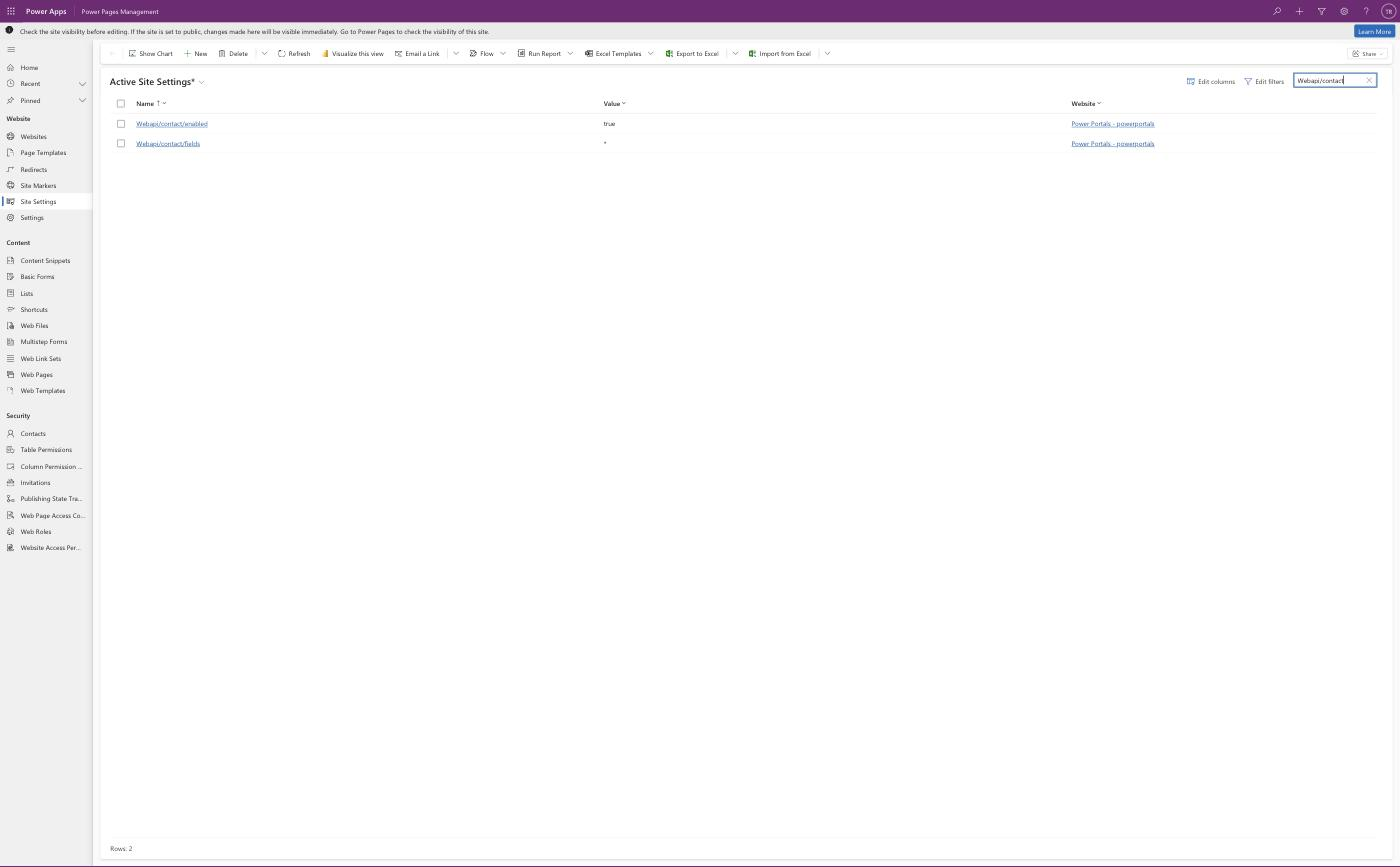
Also grant a table permission with read access on contact to the web role you are testing under. Without a table permission you get a permission error instead of the behaviour you are trying to observe.
After every site setting change, call /_services/about and trigger Clear Cache. Without cache invalidation you are measuring the old state.
The call
For read calls, your browser's address bar is genuinely enough. Signed in to the portal, just open the URL directly:
https://YourPortal.powerappsportals.com/_api/contacts?$top=1&$select=contactid,firstname,lastname,emailaddress1
The browser renders the JSON response directly, no tooling required. I still walk through the console version below, because it counts and formats the column list for you automatically, and because the same technique is required anyway for write calls (POST, PATCH), which the address bar cannot do. In the console, signed in to the portal:
fetch("/_api/contacts?$top=1&$select=contactid,firstname,lastname,emailaddress1", {
  headers: { "Accept": "application/json" }
})
  .then(r => r.json())
  .then(d => {
    const rec = d.value[0];
    console.log("columns returned:", Object.keys(rec).length);
    console.log(Object.keys(rec).sort());
  });
Write calls additionally need the CSRF token. Microsoft's documented webapi.safeAjax wrapper fetches it internally through shell.getTokenDeferred() and sets the __RequestVerificationToken header from it, that is the current state, checked against Microsoft Learn. Read only GET calls, like the one above, work without it.
Observation from the demo site: leaving $select out of the URL fails with a permission error, even when the fields setting is configured correctly. The server appears to treat a call without an explicit column selection as an implicit request for every column, and checks that against the permission. Put exactly the columns from your fields setting into $select.
Before: fields = *
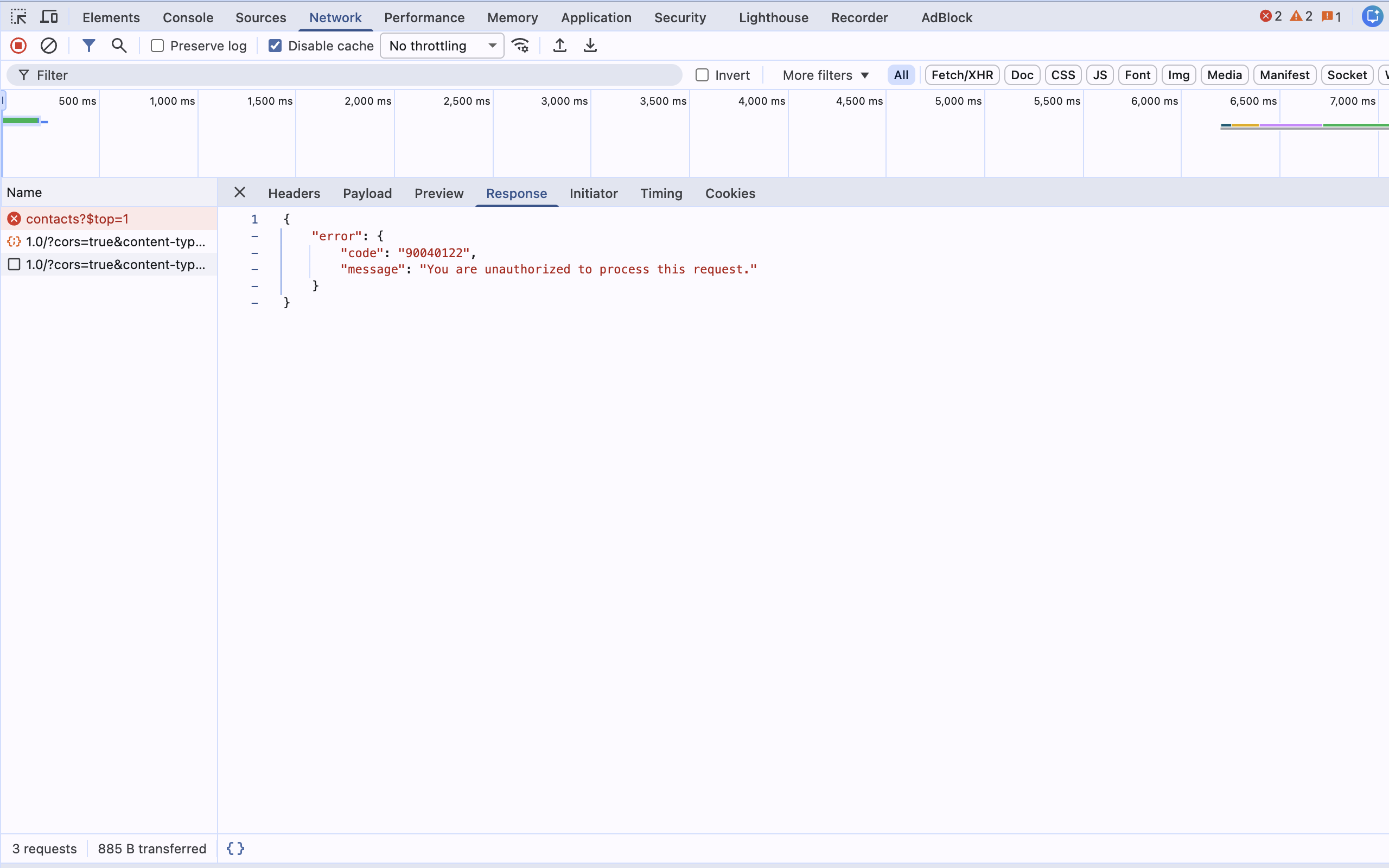
The demo site was created on 16 August 2026, after the August cutoff where Microsoft stops letting newly created sites use the wildcard value at all. The call with fields = * on this site does not return a column set, it returns an error today: HTTP 403, code 90040122, message "You are unauthorized to process this request." This code is not yet listed in Microsoft's official Web API error table, likely because it is new with the wildcard restriction. This is not a future edge case. It is the current state of every site created since August 2026.
On sites created before that cutoff, the wildcard value still works as of now, until support is removed for everyone on 14 September. I cannot show you the actual column count such an older site returns, because the only demo site available already falls into the new category. On a standard contact table with a few custom fields, expect a high two-digit to three-digit number. You can measure it yourself in your own older environment in about a minute.
After: an explicit list
Change the setting to the columns your page actually needs:
Webapi/contact/fields → contactid,firstname,lastname,emailaddress1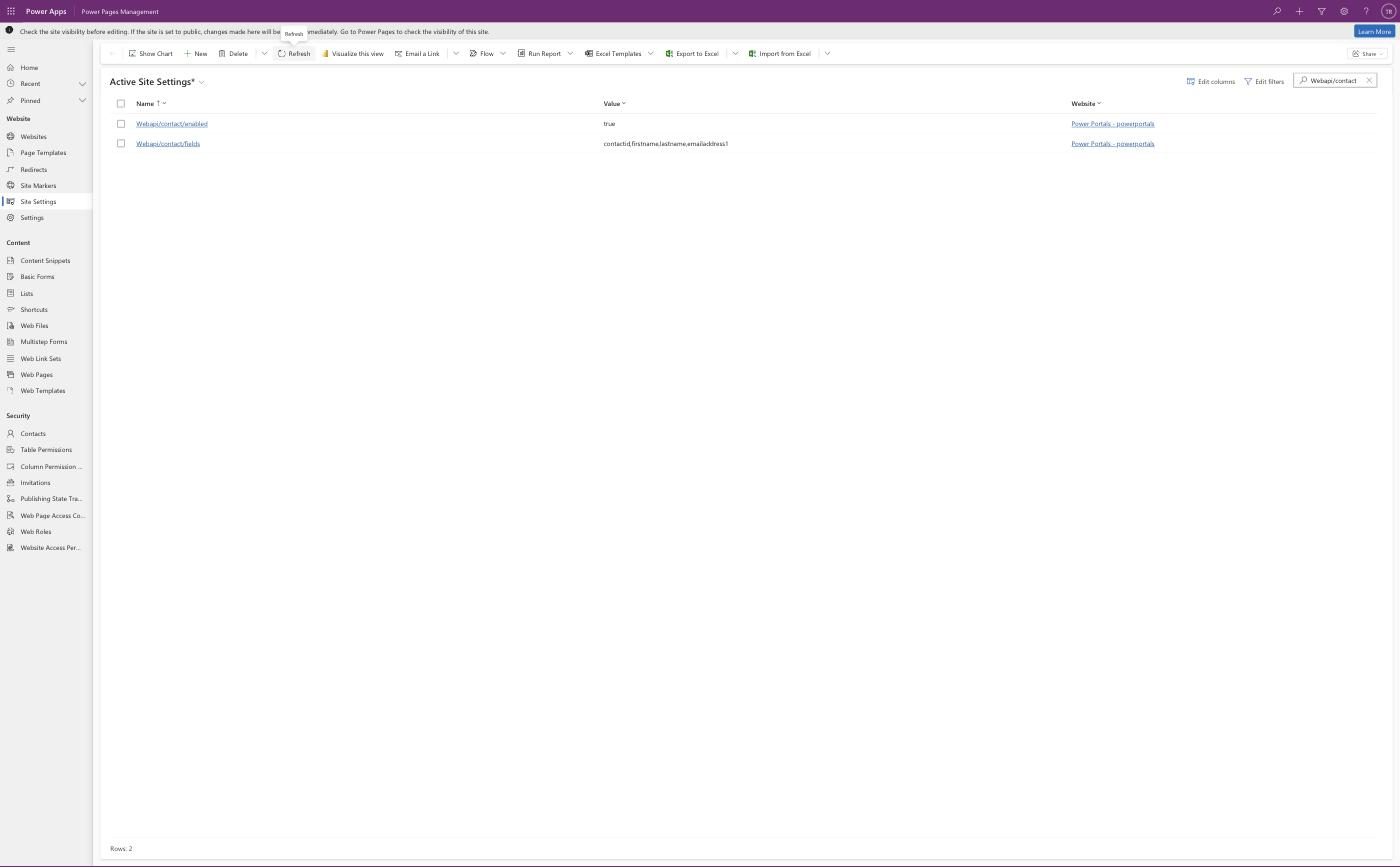
Invalidate the cache, repeat the call with a matching $select. The response now carries exactly the four requested columns plus the @odata.etag housekeeping field, five entries measured in the JSON, nothing else. The page behaves exactly as before, and the surface area is limited to what you actually asked for.
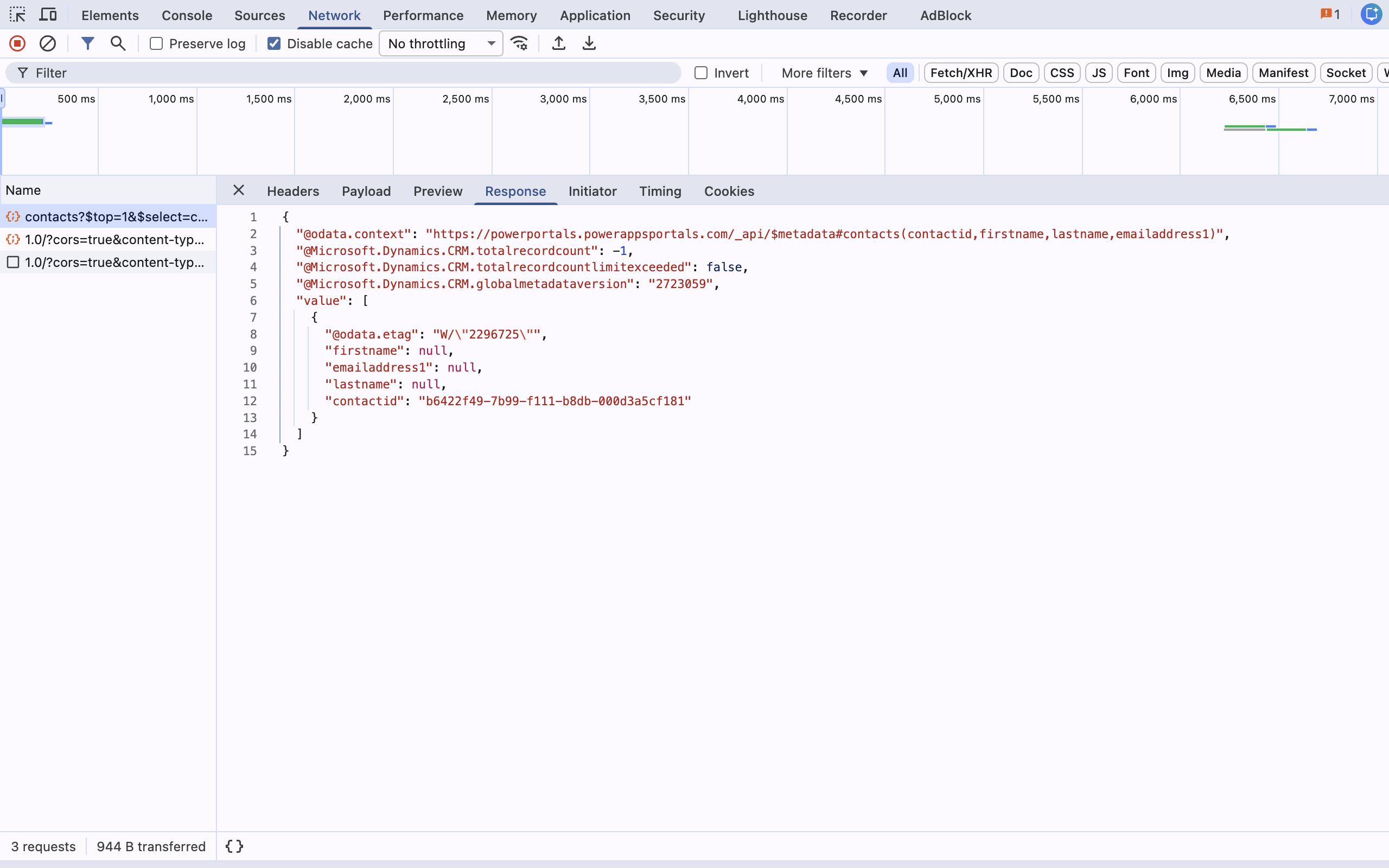
The setting takes schema names, not display names. That detail costs time during the migration. emailaddress1, not "Email". For custom columns that means including the prefix, for example new_customernumber. The attribute picker controls in the modern configuration experience hand you the list comma separated, which saves both typing and typos.
The 10 minute self check
You need access to the Portal Management app and a list of your sites. Budget ten minutes per site.
Step 1: filter the site settings
Open the Portal Management app, go to Site Settings, and filter the Name column on the substring Webapi/. You now see every Web API setting for that website. Design studio shows the same records under site settings, but the Portal Management app is faster for this job because it gives you sortable, filterable grids.
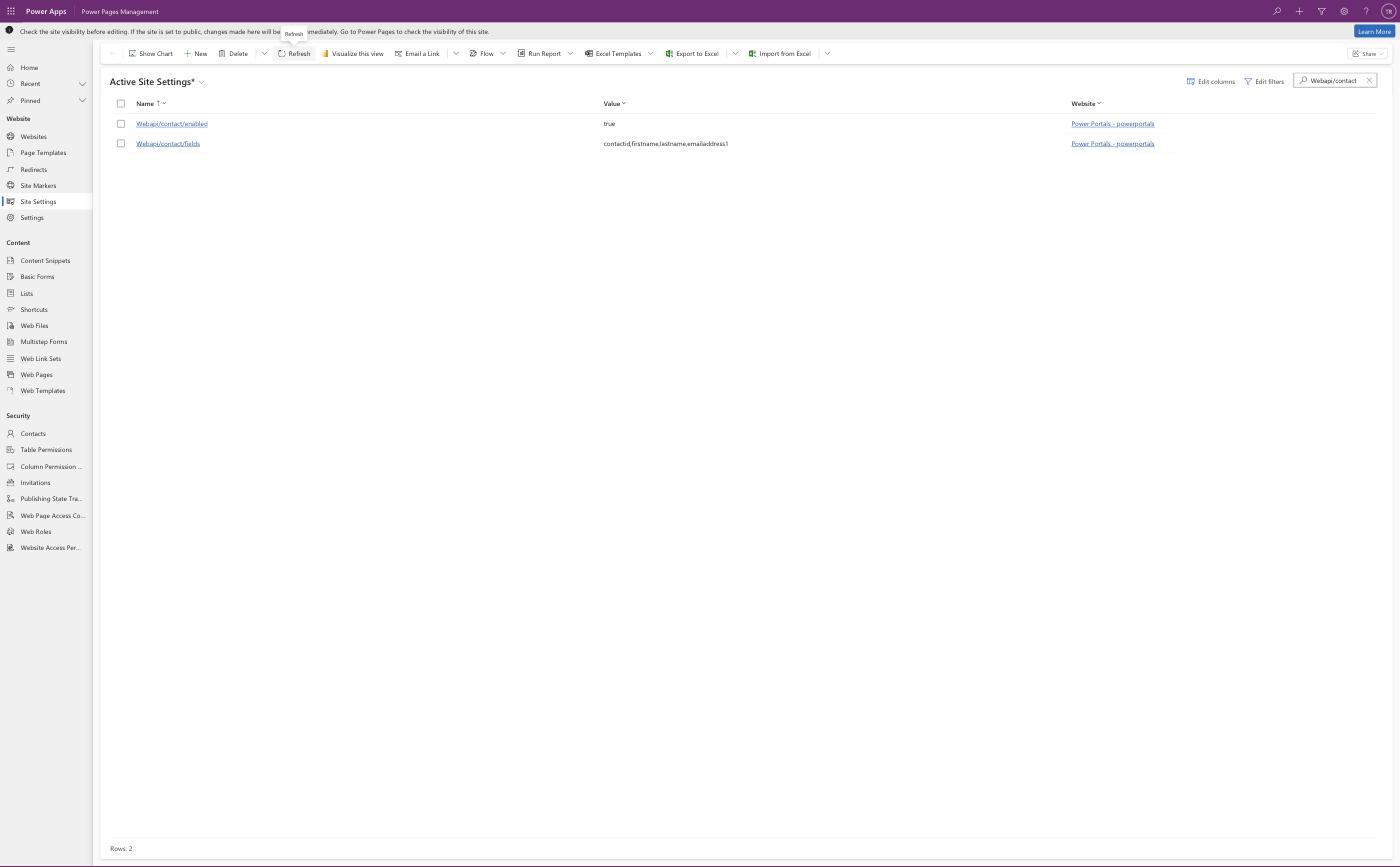
Step 2: look at the value
Additionally filter Value equal to *. Every hit is a finding. Note the table name from the setting name.
Step 3: no hits is not yet a result
If your environment holds more than one website, verify that your filter is scoped to the right one. Site settings belong to a website, and an environment with dev, test, and prod holds three parallel sets. Check all three, because the one that breaks later is production.
Step 4: determine the columns actually in use, per finding
For each affected table you need the list of columns your code reads or writes. Two ways to get there: search your web templates, web files, and content snippets for the plural table name, so /_api/contacts, and read the fields out of the $select clauses and the payloads of your write calls. Or open the affected page and watch the calls in the network tab. That is the more honest route, because it also catches code nobody remembers writing.
Step 5: change it, invalidate, test
Set the value to the list you determined, call /_services/about and Clear Cache, then click through the affected pages. Do not forget the write paths: a $select only tells you which columns are read. What a POST or PATCH writes is in the request body.
Step 6: carry it through every environment
Site settings are configuration data. Include the change in your solution so it travels to test and production and survives the next deployment cycle.
Be generous rather than minimal on the first pass. If you are unsure whether a column is needed, include it and trim later. A list that is too tight breaks the page just as thoroughly as the removed wildcard, except you find out yourself instead of on 14 September.
Why this counts as a security change
Microsoft justifies the change with security and maintainability. The wording in the documentation: using the wildcard value can unintentionally expose additional columns through the Power Pages Web API, and requiring an explicit list of columns helps ensure that only intended data is accessible.
That is accurately put, and it lands on something I see regularly in security audits. The Web API sits behind three layers of control: the user's web role, the table permissions, and the column permissions. If all three are set properly, the wildcard is untidy rather than a hole. The problem is the ordinary case: table permissions get assigned at table level, and column permissions often stay unused because they create friction early on. At that point the wildcard is the single line of configuration that decides whether a signed in portal user sees twelve columns from the console or a hundred and twenty.
Which is why the interesting part of this cleanup is not the fix. It is what becomes visible while you do it. Nearly every portal I look at has at least one Web API table that nobody on the team can still explain. 14 September is a good reason to walk that list honestly, once.
If you want to know how the other two layers look while you are at it, that is exactly the scope of a security audit: table permissions, column permissions, web roles, authentication, and the question of what data a signed in user can actually retrieve if they set out to. Fixed price from 4,900 EUR net, and the deliverable is a findings report with severities and a working order, not two hundred lines of tool output.
What to do now
Four weeks to 14 September 2026. The order I would recommend:
- Run the self check above today, for every site and every environment. The output is a list of affected tables.
- This week, determine the column lists and switch dev over.
- Next week, move through test to production, with a regression pass on the affected pages.
- Keep the remaining buffer for whatever the cleanup turns up.
Do not leave it until the last week. Microsoft says so in the documentation itself: do not wait until support is removed, update your site settings as soon as possible.
Why my maintenance clients already knew
My maintenance clients had this information on the day it was announced, with the list of their affected tables attached. Not because I read faster than anyone else, but because the release check is part of the Power Pages Care contract.
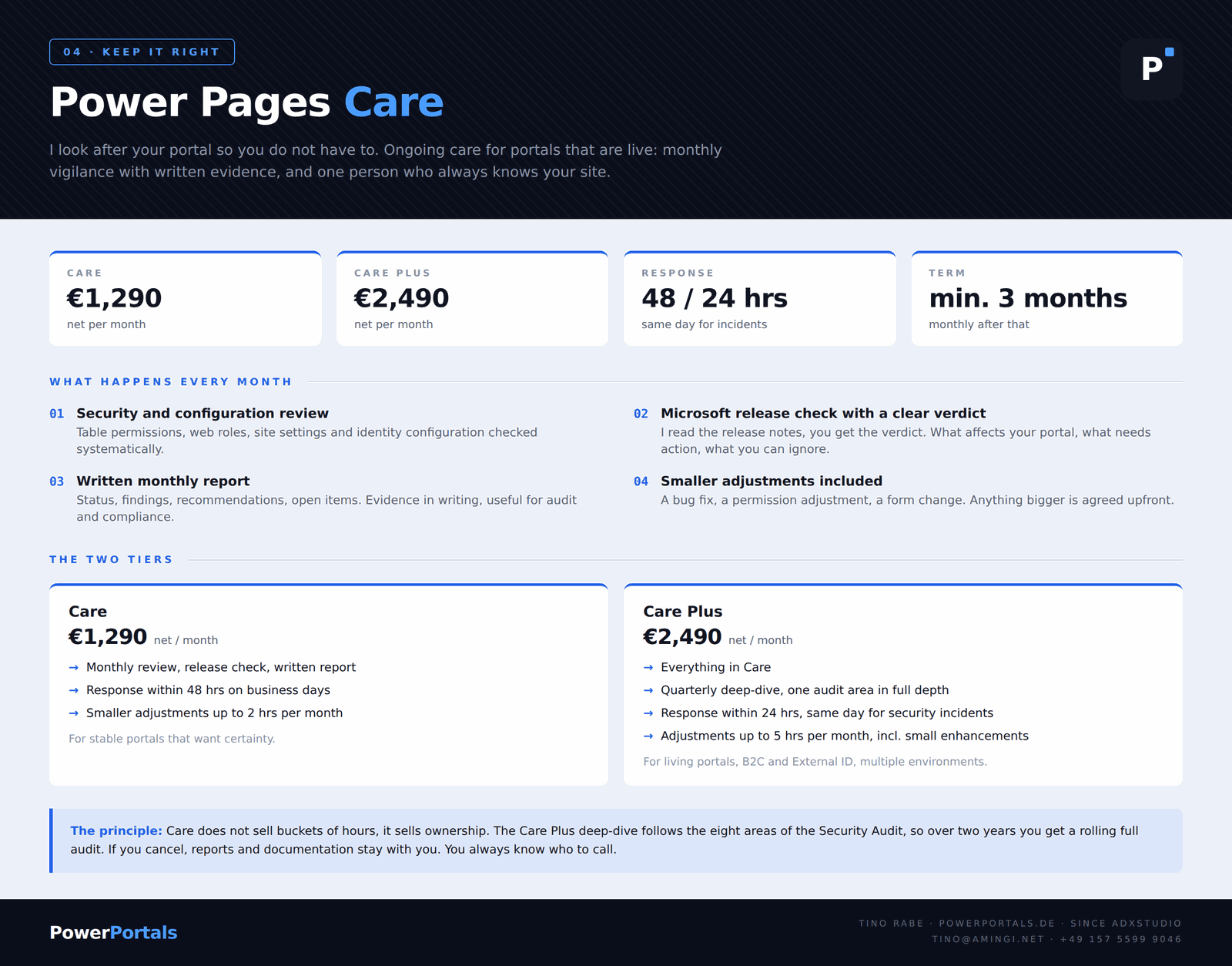
I look after your portal so you do not have to. This is not a support contract with a bucket of hours. Four things happen every month, whether or not anything is going on.
01 Security and configuration review
Table permissions, web roles, site settings and identity configuration checked systematically.
02 Microsoft release check with a clear verdict
I read the release notes, you get the verdict. What affects your portal, what needs action, what you can ignore. The wildcard case ran exactly that way.
03 Written monthly report
Status, findings, recommendations, open items, in a form that also works for audit and compliance.
04 Smaller adjustments included
A bug fix, a permission adjustment, a form change. Anything bigger is agreed upfront.
Care is 1,290 EUR net per month, with a 48 hour response time on business days and adjustments up to two hours a month. Care Plus is 2,490 EUR net and adds a quarterly deep-dive covering one audit area at a time, a 24 hour response time, same day for security incidents, and adjustments up to five hours. Minimum term three months, monthly after that.
The deep-dive follows the eight areas of the Security Audit, so over two years you get a rolling full audit. If you cancel, the reports and documentation stay with you.
A portal without that view finds out about changes like this on the day the form stops saving. That is the whole difference.
You always know who to call. Onepager and terms at powerportals.de. Questions go straight to [email protected].
Related Articles
Power Pages 2026: The Quiet Hardening Series
Why the wildcard case is not a one off but part of a series running since 2022, with a timeline and the question of who is watching for you.
Read article → DevelopmentLiquid FetchXML vs. Web API in Power Pages
A decision tree, performance comparison, and security patterns between the two data access paths in Power Pages.
Read article → DevelopmentLink Previews for Power Pages
A different Power Pages security trap: opening table permissions to fix a broken preview, and the safer way to do it.
Read article →Sources
- Important upcoming changes and deprecations in Power Pages, section "Wildcard value (*) in Web API field configuration", document date 14 August 2026
- Overview of the Power Pages portals Web API, site settings, endpoint structure, table and column permissions
- Assign table permissions
- Column permissions
- Compose HTTP requests and handle errors for the portals Web API, error code table (code 90040101 listed there, code 90040122 from the demo test is not)