This is the third and final part of a small arc about reading a many-to-many relationship in Power Pages, and it closes the loop in a satisfying way.
Part one read N:M with Liquid FetchXML: server-rendered, but preloaded at page render. Part two moved the same read into Server Logic called on demand from the client, no query in the browser, but a client round-trip with a CSRF token. Each side had a cost.
The serverlogic Liquid tag removes both costs at once. The same server-side operation from part two, invoked from Liquid while the page renders. No client call, no CSRF token, and the query still never touches the browser. Microsoft shipped this in 2026, and it is the piece that makes the whole thing a circle: reusable, testable server logic, rendered straight into the page like FetchXML was.
The tag
{% serverlogic name: 'installation-products',
             operation: 'getInstallationProducts',
             output: result %}

{% if result.success %}
  <ul>
  {% for inst in result.data.installations %}
    <li>{{ inst.name | escape }}</li>
  {% endfor %}
  </ul>
{% endif %}
Four parameters: name (the server logic record), operation (the JavaScript function to run, any function you define, not just get), input (optional string, JSON when you need structure), and output (the Liquid variable that receives the result). The result object carries success, status_code (500 on an execution error), data (the parsed JSON your operation returned), and raw_result (the unparsed response, for when the return value is not valid JSON).
The key line from Microsoft's docs: this server-side invocation "doesn't require a client-side HTTP request or Cross-Site Request Forgery (CSRF) token." Assign the server logic record to a web role the current user can access, and the tag does the rest at render time.
The full circle, live
I built exactly this in the demo portal: a web template with the tag above, calling an operation that reads the N:M relationship from part one and returns a compact list. Signed in as a portal user, the page renders the linked products server-side:
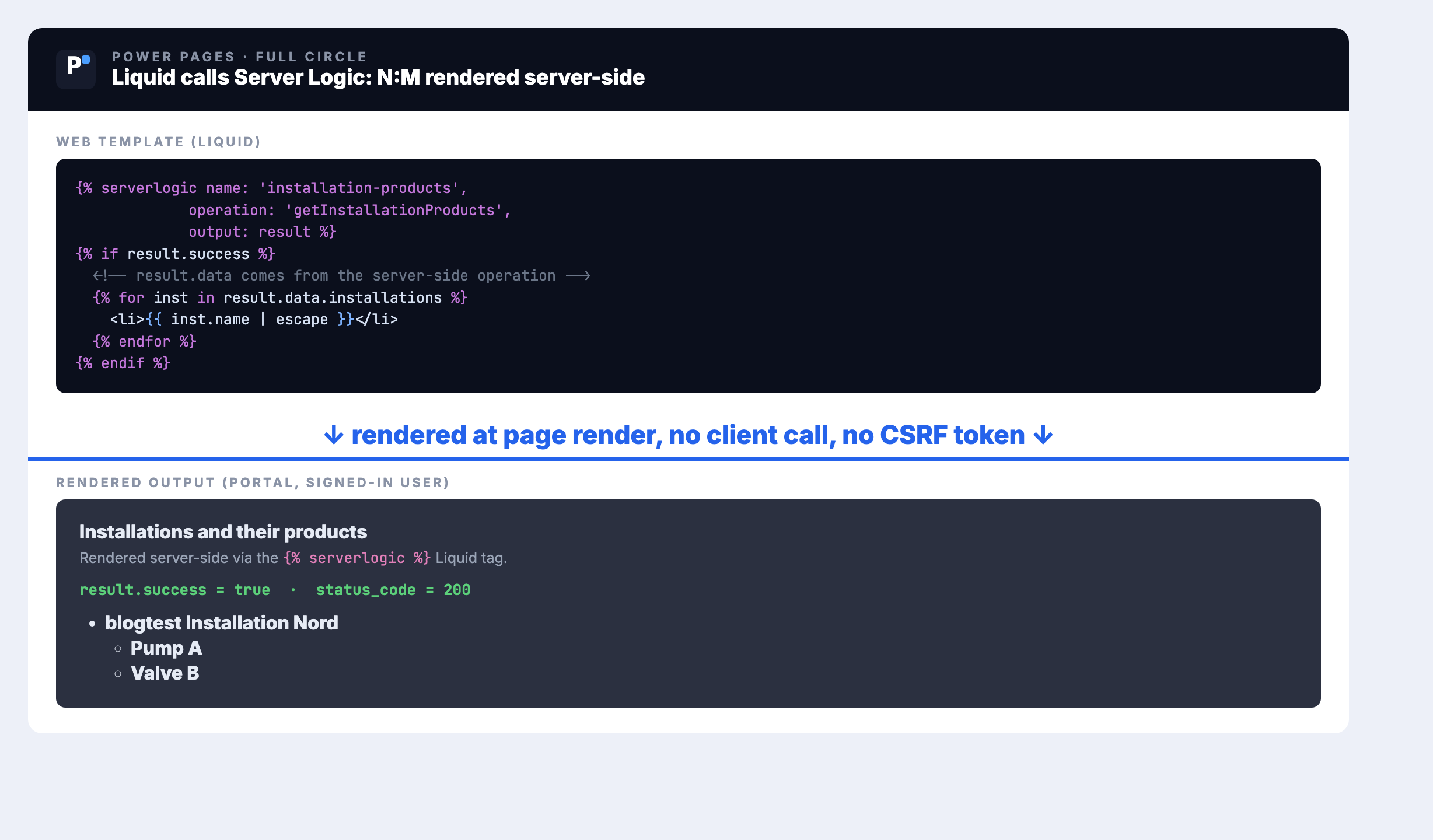
Same data as part one (Pump A, Valve B under an installation), same server-side Dataverse connector as part two, now rendered directly into the page by Liquid. That is the circle closed.
One function, two contexts
Here is the detail that saves you an afternoon. The same server logic function can be called two ways, from the client over HTTP and from Liquid, but it reads its input from two different places:
- Called over HTTP:
Server.Context.QueryParameters["id"], plusBody,Headers,HttpMethod. - Called from Liquid:
Server.Context.Input, the string you passed in the tag'sinputparameter.
If you write one operation for both entry points, branch on the input source. QueryParameters is empty in a Liquid invocation, and Input is empty over HTTP.
Two things the docs do not spell out
I hit both while building the live example, so you do not have to.
The connector returns an envelope. When you consume the result inside the operation (rather than returning it straight through), Server.Connector.Dataverse.RetrieveMultipleRecords gave me a { "StatusCode": 200, "Body": "..." } string, where Body is the OData JSON as a string. You parse twice: the envelope, then Body, then reach value. The docs' examples return the connector result directly and never show this, so the first time you try to loop over result.value you get nothing.
function getInstallationProducts() {
  var options = "$select=pwrprtl_installation_name" +
    "&$expand=pwrprtl_installation_product($select=pwrprtl_product_name)";
  var res = Server.Connector.Dataverse.RetrieveMultipleRecords("pwrprtl_installations", options, true);
  var envelope = (typeof res === "string") ? JSON.parse(res) : res;
  var odata = (typeof envelope.Body === "string") ? JSON.parse(envelope.Body) : envelope.Body;
  var rows = (odata && odata.value) ? odata.value : [];

  var installations = [];
  for (var i = 0; i < rows.length; i++) {
    var prods = rows[i].pwrprtl_installation_product || [];
    var names = [];
    for (var j = 0; j < prods.length; j++) { names.push(prods[j].pwrprtl_product_name); }
    installations.push({ name: rows[i].pwrprtl_installation_name, products: names });
  }
  return JSON.stringify({ installations: installations });
}
Compiled server logic is cached. After you edit the code, the endpoint and the Liquid tag keep serving the previous version until the site cache is cleared (/_services/about, Clear cache, with an administrator web role). If a change does not seem to take, it is the cache, not your code.
Security: no CSRF is not no responsibility
Skipping the CSRF token is safe here because the call never leaves the server; there is no cross-site request to forge. But the operation still runs in the current user's context and respects web roles and table permissions, and the authorization decisions are still yours. Microsoft is explicit: treat input and returned values as untrusted. Validate Server.Context.Input before it touches a query, and apply the escape filter before rendering any returned string into HTML, exactly as in the tag above.
And the one real cost: the tag runs while the page renders, so a slow Dataverse query or external call increases page response time. That is the trade you make for server-side rendering. When responsiveness matters more than first paint, keep the client call from part two.
Three server-side ways, one decision
| You want | Use |
|---|---|
| N:M (or any read) rendered at page load, simple query | Liquid FetchXML (link-entity / intersect) |
| Reusable/testable logic rendered at page load | {% serverlogic %} tag (Server.Context.Input) |
| The same logic on demand, after load | Server Logic over HTTP (safeAjax, CSRF, QueryParameters) |
| Write N:M (associate / disassociate) | Portal Web API $ref |
FetchXML is the quickest path for a plain query. The moment the logic is worth reusing or unit-testing, {% serverlogic %} gives you that at render time, and the same operation answers a client call after load. Three tools, one mental model: decide by when the user needs the data and how much logic sits behind it. That is the arc, closed.
Related articles
N:M on demand with Server Logic
Part two: the same read, invoked from the client on demand, no query in the browser.
Read article → DevelopmentReading N:M: Web API vs. FetchXML
Part one: where the Web API stumbles on N:M, and the Liquid FetchXML workaround.
Read article → SecurityPower Pages security architecture
Web roles and table permissions: the model that still governs server logic, CSRF or not.
Read article →Sources
- Microsoft Power Platform blog: Extend Liquid with Server Logic in Power Pages (the announcement)
- Microsoft Learn: serverlogic Liquid object (syntax, parameters, result attributes)
- Microsoft Learn: Author server logic, call from Liquid ("doesn't require a client-side HTTP request or CSRF token"; render-time cost note)
- Microsoft Learn: Server objects, Context (
Server.Context.Inputfor Liquid vsQueryParametersfor HTTP) - Hands-on in the Power Portals demo portal: a web template invoking a server logic operation via
{% serverlogic %}, rendering the N:M list server-side, verified live (result.success true, status_code 200)